
To export a list from a SharePoint site you can follow the steps below.
- Ensure that the user account performing the process is a member of the farm administrator group
- In Central Administration, on the Home page, click Backup and Restore on the left hand menu.
- On the Backup and Restore page, in the Granular Backup section, click on the Export a site or list option.

- On the Site or List Export page, select the appropriate web application, site collection and list that you want to export.
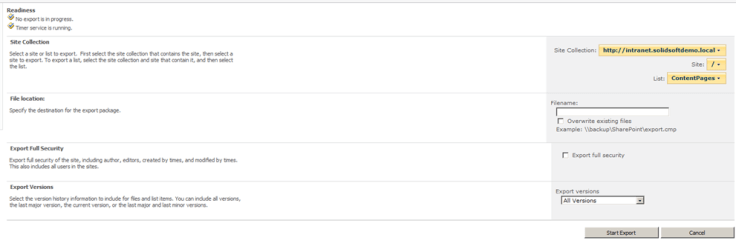
- In the file location section enter the UNC path of the export folder. This should be a share on either the server or another network location.
- If the file already exists and you want to overwrite this, then select the overwrite existing file option.
- Select the export full security check box if you want to export all the security and permissions settings with the select list or library.
- When you are happy with the selected options click on the start export button
 The Microsoft Cloud Blog
Leave a comment