
When branding a SharePoint site it is common to want to remove certain default Web Controls or Content Place Holders. However I came a across an instance today where I had commented out a number of place holders (specifically the PlaceHolderPageTitleInTitleArea place holder) , the site compiled ok and allowed me to deploy it to a site. The problem came when I tried to add a web part to the site, at this point the “You must specify a value for this required field” error appeared and would not let me save the new created web part.
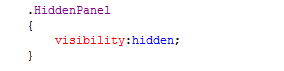
It appears that some controls are still required on the master page for various tasks such as adding web parts. On reflection it seems that the best practice for skinning SharePoint Sites would be not to remove or comment out place holders but to enclose them in a containing element and set the visibility status to hidden. for example:
CSS
Code Behind

By following these steps I was able to hide the content on the master page as I wished, whilst still leaving the master page in an operational state.
 The Microsoft Cloud Blog
Leave a comment